Note to Self: Get Off the Internet and Research the Old Fashioned Way

Last week I took a genealogy “vacation”.  I didn’t go far in miles but I did in years.  As I live where the majority of my ancestors did going back to (at least) the 1800s, my trips were local.

I love the convenience of internet research.  But I also LOVE on-site research.  I love walking into a library, archive or society and getting that first whiff of old books, flipping through big, bound volumes of records and chatting with other researchers.  So, I decided to take a few days and do some on-site searching. 

The main focus of my research was to explore the Whitaker line on my mother’s side.  Most of the information I had to date came from census information, I had done no in-depth research.  Some searching on ancestry.com revealed that this line had a long history in the county that I live in.

So I made some preparations for a couple weeks beforehand.  I normally wouldn’t spend quite this amount of time but this line has gone largely unresearched, so I was essentially starting with nothing but some names and estimated dates.

  • First, I spent some time with my database file, getting familiar with the names, dates and locations for the family I wanted to research.  One thing I realized is that this family has been in Harford County longer than the county existed.  So, I may also need to search Baltimore County for records before 1774.
  • Then I spent an evening in my local public library.  They have a “Maryland Room” with extensive local history resources.  I found some additional information in books and compiled data.
  • I hopped on ancestry.com to look at some other trees for “clues” I was missing and made notes.
  • One of my favorite types of records are land records, so I spent some time with mdlandrec.net plowing through land records.
  • Based on the sources listed in the books from the library and others’ information on ancestry.com I knew I should visit the Historical Society of Harford County, the Maryland State Archives and the Maryland Historical Society to start.  So I double-checked their websites to check the days and hours they were open so I could plan my research week.
  • I had never been to the Historical Society Harford County before so I wanted to spend more time there to get the lay of the land. I decided I would go there Tuesday and Wednesday, the Maryland State Archives on Thursday and the Maryland Historical Society on Friday.  There would be no cemetery visits during my week because we have gotten so much rain recently that I was afraid it would either be too soggy, plus there was more rain in the forecast.  I will save that for another time…and advantage of being local.

Then my research week arrived:
Monday – None of my repositories were open so it was back to the library for more searching there.  I found some more references to church records and tax lists.

Tuesday/Wednesday – Off to the Historical Society Harford County across town.  They charge $5 for non-members to do research but I went ahead and joined for $30.  I am certain I will get my money’s worth.  I got a tour and an overview of the collections.  I decided I would start my searching with the vertical file.
I pulled the Whitaker family file and the first thing in the folder was a 1973 article from the local paper (complete with a picture) about how, when demolishing a house, the workers discovered a burial plot marker being used as a back step.  The over 500 pound marker had the names of my 5th great-grandparents and several of their children.

WOW!! 

Second, an article written by a Whitaker descendent in 1984 about the Whitaker family that was published in the Maryland Historical Magazine outlining the family.  This article had lots of references to wills, other land records and sources for dates and marriages.  Awesome information!
Including the time it took to signup and get a tour I have been here 25 minutes and already found 2 great pieces of information I never knew existed!

By the end of my second day there I had lots of new information as well as sources for names and dates that I had “collected” in the years previous.
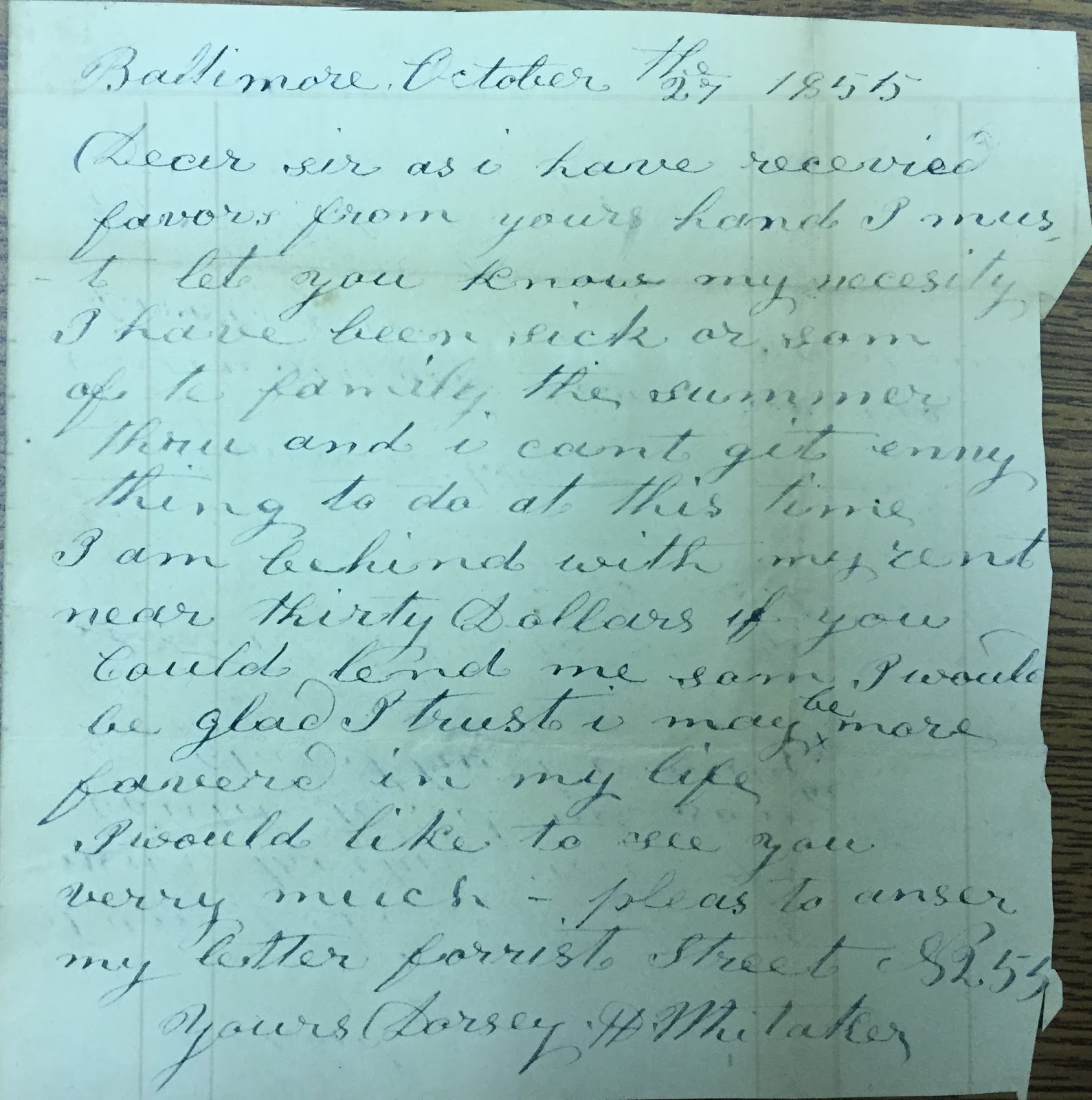
But I think the coolest thing I had and was able to hold in my own hands was a letter, written by my 4th great-grandfather Dorsey H. Whitaker.  Dorsey was born, married and raised a family in Harford County but later moved to Baltimore County and then Baltimore City, where he died of throat cancer in 1876.  It seems that as he got older he had money problems (based on land records and legal records I found) and this was confirmed when I found a letter written in 1855 from Dorsey to Otho Scott, a Harford County lawyer (and I think a cousin to Dorsey as well).

Dorsey H. Whitaker letter.  Found at the Historical Society of Harford County.  Archives folder Whitaker A-1191

Maybe at some point in the future I could have found this on the internet, but there is something special about holding the same piece of paper that your ancestor held almost 160 years ago.

Thursday – My longest trip of the week, a 45 minute drive to the Maryland State Archives.  I have been to the Archives many times and always have a hard time staying on task because there are so many records.  This time was no exception!
I only found a few Whitaker records before the “BSOs” (bright shiny objects) got to me.  But I crossed several records from my wish list so the trip was successful.

Friday – Unfortunately my Friday trip to the Maryland Historical Society did not happen as I had to take one of my dogs to the vet.  However, I do visit there often so I wasn’t too upset.  I will get there again very soon and hopefully cross a few more items off my list.

I am so glad that I took that time to do on-site research and I kick myself that I don’t do it more often, especially since I have such great facilities so close to where I live. 

My Ability To Transcribe Deeds Just Got A Lot Faster

I hate to type.  I love land records.  These two things do not go together.

I have found so much great information in land records and I am lucky that many of the records I need are in Maryland.  In Maryland, all verified land instrument records are on-line (and free) through MDLANDREC.  All that is needed to access the records is a username and password, offered with a free registration.

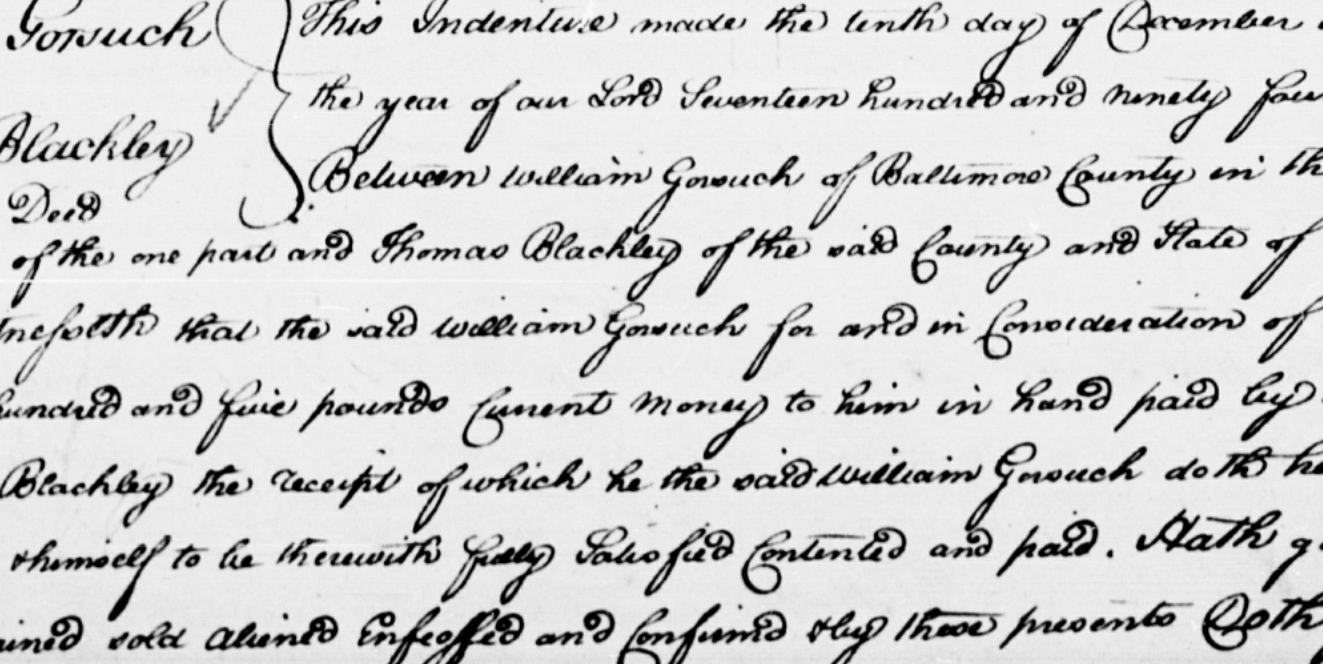
The problem with getting all these great records is that the older records are hand written.  In general the copies are good, but they are tedious to read and even more tedious to transcribe, especially when you hate to type.

SOURCE – BALTIMORE COUNTY COURT (Land Records) WG RR, p. 0172, MSA_CE66-92

So since I had some gift cards burning a hole in my pocket, and a bunch of records to transcribe, I decided to spring for Dragon NaturallySpeaking.  I had heard some good things about the software and several administrative people in my office use it.

After my purchase I installed it and have been using it for about a half an hour.  So far I love it! In fact, I’m not typing this blog, I’m having Dragon do it for me.

I was hesitant on buying a voice recognition program because I have problems with phone systems that can supposedly use verbal cues in their menus.  But to this point I haven’t had any issues.  During set up it had me read a few paragraphs of text so the software could learn my voice.  Also, I have the TV on in the background and Dragon doesn’t seem to have an issue with picking up that noise.

I still have a lot to learn about the software, but to be able to go from installation to using it successfully in ten minutes is awesome.  I’m sure the cost of the software will be prohibitive for some, but for me the amount of time it’s going to save his worth that cost.  I purchased the Premium version which is supposed to work with spreadsheets, so I may not even need to worry about using Google Forms any longer.

Oh, and not only does this software type better than I do but it spells better than I do too!

Using Google Forms to Collect Information from Newspapers

I have been doing a lot of newspaper research recently.  I like to track what I find in a spreadsheet, it allows me to quickly sort my information and color-code cells for analyzing the data.  The problem is I hate to fill out spreadsheets.  I just don’t like the layout when typing in all the stuff I need to put in the spreadsheet.
I use a lot of spreadsheets at work but I rarely create a spreadsheet from scratch.  Usually my spreadsheets are created from some other application that “exports” to the spreadsheet format.  I guess since that is what I am used to, that is what I like.
Also at work I recently discovered Google Forms.  I had to survey some of my co-workers and Google Forms was suggested as a way to create a quick, free survey.  Once I create the survey in Google Forms I can send it to my co-workers and once they fill out and submit the form their responses are collected within a spreadsheet.
As I was learning more about Google Forms I thought, “this may be a tool I can use for genealogy”.

I started doing a little googling.  I was sure I wasn’t the first person to come up with using Forms for genealogy.  I stumbled upon a webinar that Thomas MacEntee did way back in 2011 for the Legacy Family Tree webinar series (Google Forms for Genealogists).  I haven’t heard him really mention Google Forms recently, so maybe he isn’t using them as much as he was then.  Some of the “quirks” he mentioned back then have been addressed in updates to the Forms app, some haven’t.  But I think for my use it will be fine.

So my first step is to figure out what fields I want in my form:
1. Name of paper
2. Date of item
3. Page
4. Column
5. Type of article (Birth, Marriage, Death, Court, Land, News)
6. Transcription of article
7. Link to Image of paper

Based on the type of news item I will then have different fields I want to collect.
For example, if it is a birth notice I want to collect:
– Name of baby
– Name of father
– Name of mother
– Date of birth
– Place of birth

If it is a marriage item I want to collect:
– Name of groom
– Name of bride
– Date of marriage
– Place of marriage
– Name of officiant
Once I figure out what fields I need on the form I will create the form.  Since I will be the only one using it (for now) the form doesn’t need to be fancy.  But it can be customized and themes assigned to the form if you want.

Then when the form is designed I can start using it to collect my newspaper information.

I’ll be experimenting a bit with my form and next time I will have more detailed instructions on the process of creating the form and using it.
If this goes well I am thinking of using a form as a replacement for my vital records spreadsheet as well.
Stay tuned…

Evaluating Signatures

Several years ago I was helping someone with research on one of their ancestors.  He was was looking for an ancestor that had a fairly common name in a big city.  It was difficult to track which guy was “the guy” due to similar names, ages, spouse names and inconsistent birth/marriage dates.

At the time, one of the things we were doing was looking at signatures on different documents and comparing them to try and find the correct ancestor.  We had a few that were vaguely similar but enough differences to assume they weren’t the correct person. 

I am no expert in handwriting analysis and I understand that how someone signs their name can change over time but I was pretty confident at the time that we could rule certain samples out.

But a co-worker said something to me today that has me rethinking our analysis back then.
I had to update some forms and my co-worker had copies of the forms I signed five years ago.  I was also required to provide my drivers license (which I renewed and signed two years ago).
After I signed the forms and handed over my license the co-worker said, “are you sure these old signatures are yours?”.  Of course I was sure…I signed them.  Then it hit me.

Last June I was hiking, slipped on a rock in a stream, fell and broke the middle finger on my right hand.  The x-rays revealed a benign tumor in that finger which required surgery once the break healed.  I spent all of June, July and August with a splint that immobilized the last 3 fingers of my right hand.  Then came 4 months of therapy to try and restore the range of motion of my fingers (which I still do not have).  I still cannot make a fist or hold a pen the way I did before the fall.  Therefore, I am not able to sign my name the way I did before, I am not sure I ever will.

In 100 years when someone is researching me, if they find documents with my signature, and they compare them, I am sure it will be confused. 

By the way, in the times since the original signature evaluation of my friend’s ancestor, he has been able to find additional information that allowed him to find the right guy.  One of the signatures we had ruled out did belong to him…three of them did not.

Shout Out to "Coach" Martin

Yesterday the I encountered the spirit of “Coach” Jerry Martin.

But first, let’s back up.  One Saturday during the summer after 9th grade in 1980, my mom and I went to Triangle Sporting Goods at Towson Plaza to buy something, who knows what.  That’s when I first met Mr. Martin.  He recognized my mom from high school, they went to Hereford together.  They chatted, he mentioned teaching and coaching at Perry Hall high school and mom mentioned that I would be going there in the fall.

Through my high school years (and after), although I didn’t run track or cross country, when I would see him he would always address me by name and ask how my parents were.  Probably the last time I saw him was sometime in the early 1990s.

When he passed away, I read his obituary and realized that not only did he and my mom know each other in high school but that they were distant cousins.  I asked my mom if she knew they were cousins and she said, “oh, yea, that vaguely rings a bell” but she didn’t know exactly how they connected.  I got out my tree and we talked about how they were related.

Now to the present.  Yesterday I attended a Baltimore County Genealogical Society meeting for the first time.  It was also my first visit to their library.  I was talking to the Assistant Librarian about what they had in the library and she asked if where I was searching.  When I told her that most of the people I was searching on were from northern Baltimore County she said, “Well you are going to love it here”.  She proceeded to show me several things that had been compiled by “a gentleman that had lots of information for all people he could find in northern Baltimore County”.  Then she told me that after he passed away his wife donated much of his information to the society.

She showed me the “Martin Files”, several boxes of cards files containing information on lots of folks.  She also directed me to some binders organized by names and also by places.  As she opened up one of the binders I saw the name “Gerald Martin”.  I thought to my self, “I wonder if that is Jerry Martin?”  Then she opened another and the first page had Jerry’s picture.  She asked if I knew him and I told her that I knew him from high school and that I also knew we were distant cousins but I didn’t find that out until after he passed away.

I took some time to browse the binders and it was amazing how many articles he had photocopied, organized and pasted into these binders.  Then I went over to the Martin Files and started browsing there.

That is when I got goosebumps.  In the brief time I looked through the cards I didn’t necessarily find anything new (although I definitely need to go back and look more thoroughly) but under ‘B’ I found he had my parents’ marriage announcement, my grandparents’ obituaries and funeral cards.  Then I flipped to ‘H’ to see what was there for Henry.  I found my father’s obit, my grandfather’s obit and funeral card and several obits for my great aunts and uncles.  It was amazing to see all that someplace other than in my home office (and much more organized than mine).

I wish I had gotten into genealogy earlier so I could have talked to him about our family connection.
I know that most who knew him in his capacity of teacher and coach had supreme love and respect for him.  Now I also know another side and how much he has contributed to the genealogy community as well.

I also wonder if he carried his genealogy stuff around the same way he did his grade book…tucked in the back of his shorts.  HA!!

Thank you Coach Martin, my cousin, I will be thinking of you and thanking you for many years to come I am sure!

I Miss Letters

Last night about a dozen family members on my Dad’s side got together for dinner.  My Uncle John brought some old letters with him.  These letters were written in the 1970s when he lived in Florida.  It was so fun to read and pass around, especially since most of them were written by me and my cousins when we were kids. 
Letter writing, obviously, has declined due to the internet, email and Facebook.  I didn’t realize how much I miss letters until we sat around that table and read letters last night.  Yes, you can let your kids type emails, and you can print them out and pass them around the table too.  But to see the handwriting it seems so much more personal.  I hope he shares more letters in the future.
I only took pictures of the 2 letters he brought that were written by me or my immediate family.

The first letter was written in November of 1972 by my mother.  Also included were “snip-its” from my sister and I.

You can tell it was the 1970s because my mother is inquiring if a fondue pot would be a good wedding gift for my uncle and his wife.
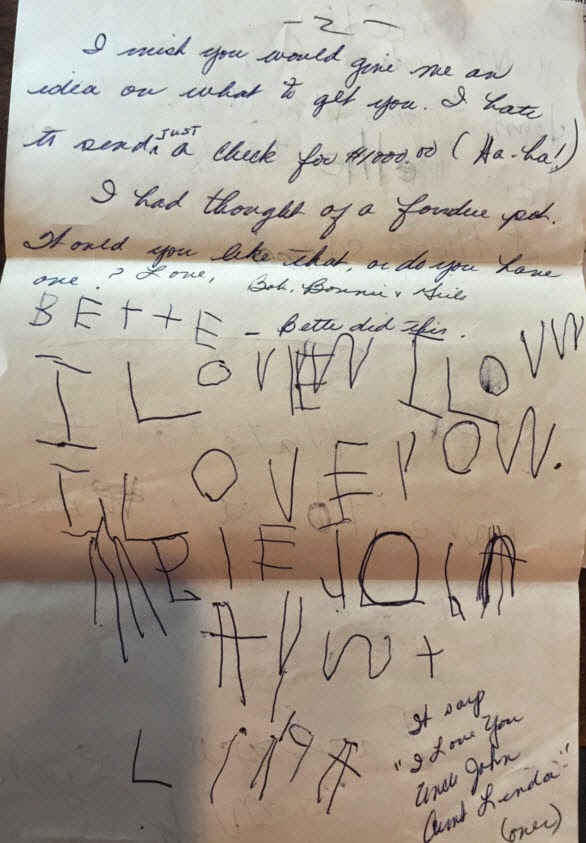
First up is my sister, she was 5 and obviously just learning to write.

Letter Page 2 – November 1972
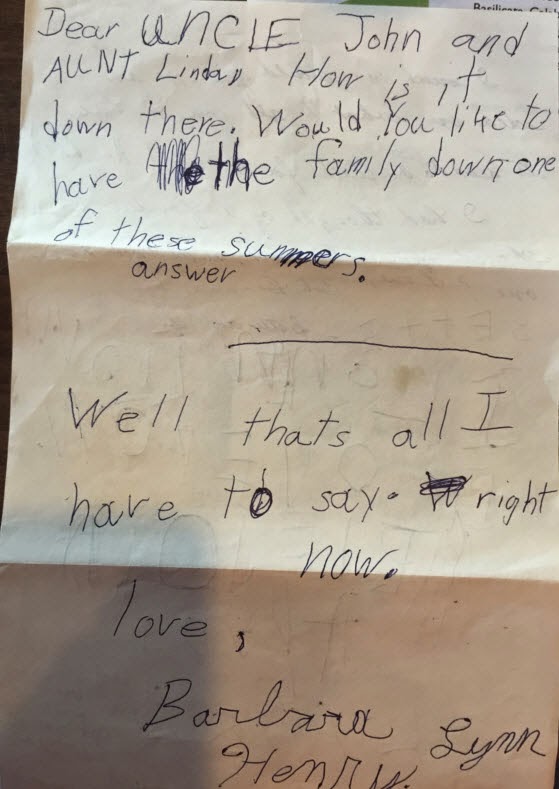
On the next page, I put in my 2 cents. I was 7.
Letter Page 3 – November 1972
I don’t have any return letters so I don’t know if he answered the question, I am sure he did.  I do know that we did not go visit them in Florida as I am sure that it was cost prohibitive for a family of 4 supported by a surveyor.
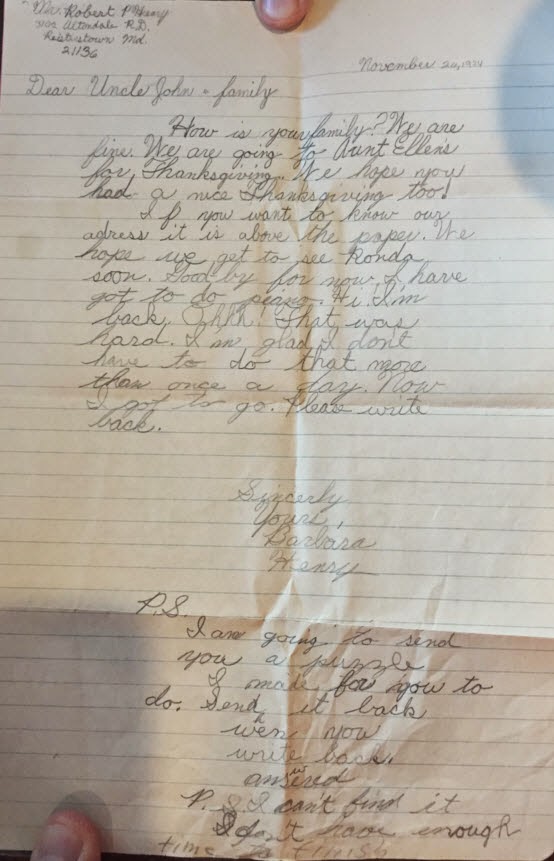
The next letter was written solo by me in November of 1974.  Apparently my family only wrote letters in November.  Judging by the address in the upper left and my formal closing, I assume it was written around the time we were learning letter writing in school.  
Letter – November 1974
It seems silly to be overjoyed by these letters but it thrills me that my uncle saved them after all these years.  It would be very easy to toss them away.  I am so glad he didn’t.

Asking For Help The Right Way

In general, genealogists are very helpful people.  Most genealogists love putting on their detective hat and helping others solve a mystery.  
I belong to several genealogy groups on facebook.  There are groups for technology, DNA, photo restoration, blogging, specific locations, and ethnicities.  Most of these groups have some of the most notable members of the genealogy community as members.  I have not only gotten help from these groups but offered help as well.

I continually see posts on these groups that are, for lack of a better phrase, set up for failure.
Let me first say that I do not claim to be an expert in the subject of social media requests.  But because of the amount of time I spend on these groups, I see a lot requests that get wonderful responses and others that are a train wreck.

I also see mentions from people that are afraid to post in groups because they are intimidated.  Hopefully, these tips will lessen that feeling and help you to post a request that will get more positive or helpful responses.

Be specific.

  • Include as many details as you can without writing a novel.  Requests like “I am looking for John Smith from Maryland.  Can you help?” require too many questions from the people who are trying to help.  I read a post like this and usually scroll right by it because there is too much missing. Even if you only have a date range or a location guess, include it.  Was John married?  If he was, did he have any children?  What have you already found about John and his family?  Any details you include can help those who are volunteering their time.

Punctuation and capitalization counts. 

  • I saw a post the other day that was about 20 lines long with no capitalization or punctuation.  AT ALL.  I tried to wade through the question but after 3 minutes I gave up.  I understand that often the people posting requests are not native English speakers, but Google Translate does a pretty good job at translating the punctuation.

    “Which is best” posts.
    I think it is these posts frustrate me the most, not because they are bad questions, but because you are asking for an opinion, and everyone has an opinion!  The four “which is best” posts I see most often are:

    • Which genealogy software is the best?  You will get LOTS of responses to this post, but unless you base your final decision by counting “votes” for each program mentioned, not a good answer.  Most genealogy programs have either a free version or a free trial.  You may have to spend a few weeks playing around with a few different versions in order to make your final decision.  But don’t you want to use a program that fits the way you research, not a program that someone else said is best?
    • What newspaper subscription site is best?  This answer isn’t an opinion, it is determined by your research location and time period.  For researching my York County, PA ancestors I have found the papers available on newspapers.com to be great!  However, it isn’t great at all for researching my Baltimore, MD ancestors.  Visit the subscription sites and see what papers (don’t forget to look at the date ranges) are available.  Also, you may want to pop for a month subscription (be sure to check for the renewal policy first) to see if you find the service worth the cost of a full yearly subscription.  Lastly, including a location and date range may get a response mentioning a free resource, such as a library or other repository.
    • What DNA company is best?  This one is tough because again…it depends on several things.  What are you hoping to find out with DNA?  Also, who are you testing, yourself, another family member?  This will determine which test you should take.  Once you decide on a specific company and test, the success you have in finding matches is basically out of your control.  It is all going to depend on who else out there is getting tested.  I see posts where people say things like, “don’t test with [Company A] because I did and I only have 4 matches”.  Unfortunately, the most likely reason you only have 4 matches is because people who are genetically related to you haven’t tested.  I have one branch of my family with hundreds of matches.  I have another branch that I only have a couple matches.  Hopefully that will change as more people test.  Also, taking a DNA test isn’t going to fill in your entire family tree.  But hopefully it helps you make some “cousin connections” to help fill in some blanks.
    • I can only afford to pay for one subscription site, which one should I pick?  Again, there are too many determining factors to adequately answer this question.  What is your research concentration area and time period?  What type of information are you looking for?  Even with that information the answers will be largely subjective based on the success other researchers have had with their own research. It is a common question, just hard to give one solid answer.  Also, many public libraries, genealogy societies and family history centers have subscriptions that you can access for free at their location.  In my area, the public library has a world subscription to ancestry.com.  I have to go to the library but I can access it through my own laptop as long as I am connected to their wi-fi.  The only drawback is that I have to comb my hair and put on pants.

    Be respectful. 
    The more respectful you are to other members of the group AND to the administrators, the more pleasant your experience will be.  Everyone, from the admins to the other members are donating their time on these groups.  They don’t “owe” you anything, but will most often jump in to help if you are respectful.

    • Be patient.  Many groups are “Closed groups”.  This means you have to request to join and an admin has to approve you.  These groups have administrators that donate their time to moderate the group.  It may take a day or two for the admin to get to your request.  The more popular groups may get lots of requests a day from people.  They will get around to you.  Also, different groups have different criteria for their members, but nothing outlandish.  They don’t want trolls.  They want people who have a genuine interest in the topic of the group.  In the genealogy groups, they will generally check your profile to see if you have an interest in genealogy.  Depending on your security settings they may not be able to see what other groups you belong to or what your interests are.  In this case, it may take longer to get approved.  But don’t sweat it.  Sometimes there will be a pinned post from the administrator on the group page.  You can send them a message if you are worried that you may not get approved, for example, if this is the first group you are joining.
    • Before you join, read the rules.  Most of the groups on Facebook have rules.  This is to make sure the page just doesn’t end up being a big advertisement page. Make it easier on the admins and follow the rules.
    • “Someone deleted my post.”  I see this many times on the RAOGK group.  99 times out of 100 the post was not deleted, there have just been so many posts that yours may fall way down on the page.  Search the group to try and find your post before accusing the admin of deleting it. Every group has a search field you can use.  It is located on the right side, at the bottom of the group cover picture.
    Search this group field
    • Don’t hijack someone else’s thread.  Do not ask your own unrelated questions on someone else’s post.  This can lead the thread off of the original topic which is not fair to the original poster.  Also, your question will probably not get the attention it deserves because it is buried in someone else’s post.
    • “Close” your thread once you get an answer.  If you post a question or request and get a resolution, please go to your original post and edit it to by adding “SOLVED” before or after the question.  This will prevent people from trying to help with something that has already been answered.  Don’t delete your post though.  Others may come along with a similar question and be able to read through the thread of your post for the answer.

    Be appreciative.
    Remember, people have volunteered their time to help you out.  You don’t have to buy them a new car, but a thank-you can go a long way.  Maybe when you close your thread instead of just putting SOLVED, you can write “SOLVED-Thank you to all that helped!”   If someone has gone above and beyond, send them a message or post a thank you to them in the thread. 

    Don’t rely on others to do all your research.
    I see people that will post 10 requests for research help in a row.  Sometimes it is obvious that the original poster hasn’t tried to do any research on their own.  These groups are created to provide help, not do all of your work.  I will tend to bypass posts from people who post multiple requests and never supply any “known” information or information on where or what they have already researched.

    “I sent so and so a message but they never responded.”  On facebook, if you send a message from someone who is not your FB friend, the message goes into a folder called “Other”.  Messages that go into the Other folder do not show up in your notifications.  Many users know not of this “other” folder.  So they may not be ignoring you, they just don’t know that message is there.  The few times this has happened to me I have posted in the group something like “Hey so-and-so, I sent you a message.  If you have not seen it, please check your “Other” folder.”  Also, if you never checked this folder before you may have some invitations from some very nice young ladies…LOL

    The “Other” folder

    Some questions may not get a satisfactory answer.   Sometimes I see a post about how a group “isn’t helpful at all”.  Then I will go to the group, search for the post and read the replies.  Even though the facebook groups have smart, resourceful and experienced researchers, it is possible that you just won’t get a clear, definitive answer.  This may be no fault of your own or the group, the answer just isn’t there.  Put that question away for awhile and try again in the future.  Again, be thankful for any clues you may have gotten but don’t automatically think that the group isn’t helpful.

    Hopefully these tips are helpful to those who may be a little intimidated when it comes to using facebook groups or for those who scratch their heads because they aren’t getting responses.

    Going Paperless??

    Anyone doing genealogy research knows there is paper…stacks and stacks of paper.  There are books, there are copies of newspaper articles, death certificates, marriage records, pictures, census records, military records, letters, land records, funeral cards, funeral books, spiral notebooks and other notepads full of miscellaneous notes.

    I usually handle all the paper by scanning the paper, saving the scanned image on my hard drive and on Dropbox and then filing the originals in my file cabinets.
    When I receive a paper record, if I don’t have time to scan it immediately I place it in a bin in my office and wait for a nice rainy day to scan everything in my bin.  Since electronic delivery is becoming more popular, my bin does not fill up nearly as quickly as say 10 years ago.
    Scanning allows me the flexibility of attaching the records to my genealogy database for that particular event.  Additionally, since I have a copy in the cloud, I can easily email or share files directly with family members.

    I am very comfortable with this process for most of my paper “stuff”.  MOST.  I do not follow the above process for my notes, and boy do I have notes!
    I am a serial note taker.  I think it stems from my school days.  Many of my teachers were “lecturers”.  They talked, we took notes.  There were minimal handouts.  We had textbooks but the majority of the classroom time was spent taking notes.
    So in my adult years I jot down things all the time, for everything from reminders to pick things up at the store to reminders to call people, etc.  For my “personal life” notes I typically use the Notes app on my phone, or I set up a reminder on my phone.  This works fine.
    But what about my research notes. The main problem is that my research notes largely have no organization.  I grab whatever is at hand, scribble a note and throw it in the pile.  I have at least 15 spiral notebooks and probably 30 notepads of various sizes with no more than 10 pages written on each, some pages may have just a single line.  There are also post-its, napkins and scraps of paper, some even just corners of papers torn from something, who knows.
    I will come across something, a name, an address, a reference and think “oh, I have a note about that” but then I can’t find it because there are so many notes to wade through (if I am even at home when it comes up).  So, how do I resolve this?

    Well, since most of my genealogy stuff exists digitally (the exception is large maps and portraits that are hard to scan), why not convert my notes to a digital format??  If my notes are digital then they become portable if they are “in the cloud” without lugging around a big box of notebooks.
    OK, well, since I embrace technology this is a no brainer…digital it is!

    Next, where do I store these digital notes in the cloud?
    I am a heavy user of both Dropbox and Google Drive.  I started using Drive first and like it because it integrates so well with my other Google apps.  Then I started using Dropbox, liked it as well, and it is easy to earn extra storage space.  I earned a bunch of free space and then moved much of my genealogy stuff to Dropbox.  I still rely on Drive for my personal on-line storage.
    So, either of these services would be a natural choice right?  Hmmm, maybe not.  Drive and Dropbox are great at storing files, any kind of file.  If I scan my existing notes as PDFs I can store those PDFs.  But besides naming the file it really isn’t an “intelligent” note and not searchable.

    Then I thought about Evernote. It is made specifically for notes, all kinds of notes.
    I have had an Evernote account for several years.  I have never really used it because I wasn’t committed to using it.  In fact I haven’t even logged into my Evernote account in probably 2 years.  However, I’ve read several articles recently about using Evernote for genealogy and it has made me want to dive head first into the Evernote world.  It seems much more evolved than when I first got an account.
    Evernote allows users to create notes and notebooks. There is also the ability to add tags and text is OCR’ed, making notes searchable.  It allows the user to “clip” items from webpage, so all my notes from some page I saw on the internet can not be captured more accurately (because we all know websites change).

    My next week or so is going to be spent reading and watching tutorials on Evernote to figure out how I should import all my existing notes.  Then to wade through all those paper notes and get them into Evernote.

    I guess I need to hope for a lot of rainy/snowy days in the future!

    Merry Christmas!

    I thought I would take a minute to wish everyone a Merry Christmas.  I hope everyone takes the chance to take a break from looking up dead relatives and spend time with living relatives and friends.

    In my family, my mother used to make Christmas dinner, as she did for every other holiday during the year.  As far as the menu, it was not set in stone, there was variety every year.
    About 10 years ago I took over the “chore” of making Christmas dinner.  I don’t remember exactly why the switch was made, but now feeding the family on Christmas day is in my hands and I enjoy it.
    The first year we had filet wrapped in bacon.  It was good but I don’t remember what accompanied the steak.
    The second year I decided to do a prime rib.  It was a big hit and now my family looks forward to prime rib on Christmas.  The sides change every year, with the exception of creamed spinach.  I think if I stopped serving creamed spinach I would be disowned!
    With a new little great nephew this year, I hope that he looks back years from now remembering Christmas dinner prime rib at Aunt Barb’s house.  Although this year he will be enjoying a bottle and Stage 1 baby food.

    In the evening my sister and I will head to my Aunt Mary’s house.  Aunt Mary is my Dad’s sister and she hosts a family gathering every Christmas night.  She has been doing this since the late 1970s when she took the tradition over after the death of my grandmother.  Ever since I can remember the Henrys gathered on Christmas night to eat and just spend time.  It is the only time during the year that I see some relatives on that side.
    As a small child I went because, well, you don’t really have much of a choice at that age.
    In my 20s and early 30s I didn’t go every year.  I exercised my independence I guess.
    After the death of my father in 2004 I have made an effort to attend every year (as long as the weather cooperates).  I now appreciate the opportunity to see these loved ones, if only for a few hours a year.

    Here is me with one of my favorite Christmas presents as a child (the bowling set, NOT THE DRESS!) in 1967.

    Christmas 1967, Freeland Md.

    For those who do not celebrate Christmas, I wish you a great end of 2014.

    Filling In The Blanks: Part Six

    This post continues my Edna Henry and family project.  I have been working on this for almost a week at an average of about 1-2 hours a day or researching.

    Since I have William and Florence’s death dates from the land records and found both of their death notices in the Baltimore Sun, I want to see if I can locate their death certificate information in the Maryland death indices.
    I will not be able to obtain the death certificates anytime soon.  They are $25.00/certificate when ordered on-line (they are certified).  So I like to wait until I have quite a few to get and then I go in person to the Archives in Annapolis, Maryland.
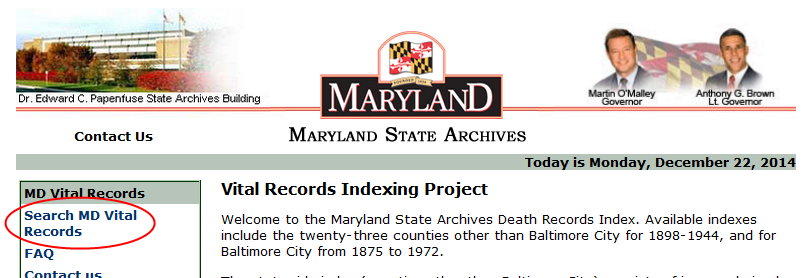
    The indexes are available on-line at the Vital Records Indexing Project.
    The index is free to search and does not require any registration.  However, if you choose to generate a death certificate order you will need to create a free account.
    On the main page, click Search MD Vital Records.

    http://mdvitalrec.net/cfm/index.cfm

    Clicking the Search link yields the search page.
    The Baltimore City indexes are separate from the County indexes.  For the county indexes, all counties are included within each available date range.
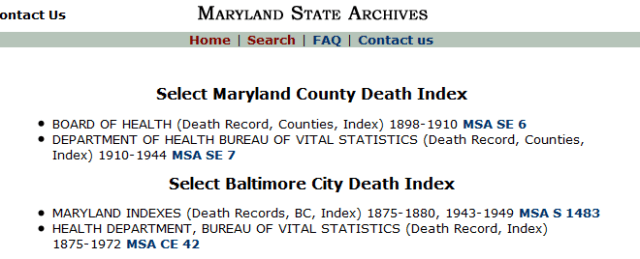
    Search page

    I will search Baltimore City first as 3030 Westfield Avenue is in Baltimore City and the closest hospitals to that location would have been in Baltimore City.
    So I will click on the Baltimore City Indexes for 1875-1972.
    The City indexes for 1875-1880 and 1943-1949 are different as the records are not scanned.  You have the ability to type in names and years.  For the rest of the indexes there are scanned images of either cards (for the counties), or index pages (for the city).

    I will select 1937 to search for William.
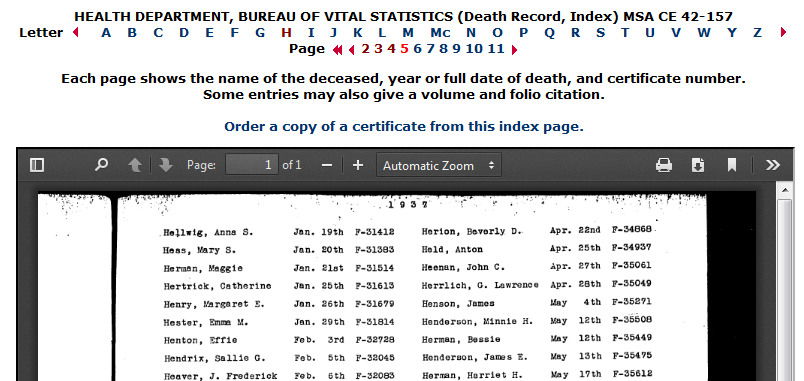
    The indexes in this time period are typed pages arranged by first letter of last name, then organized by the first vowel in the name and finally listed in order by month and day of death.  Earlier indexes are hand-written and sometimes arranged by first letter of last name and then first letter of first name.  Also, the earlier indexes that contain multiple years within a single index are a bit jumbled.  Later indexes are organized by soundex.

    I go to page 5 which covers the “H” “e” for May (William died on 5 MAY 1937).
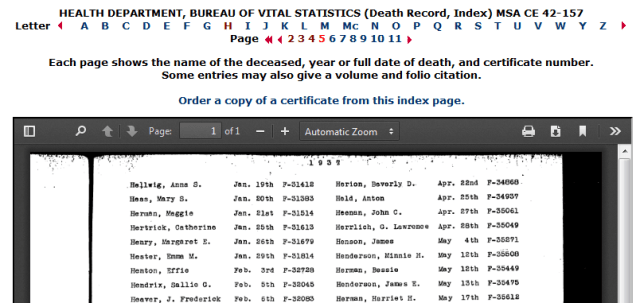
    1937 Baltimore City death index

    William R. is not listed in that time period.  I do notice however that scanning further down the page is  a “Henry, William R.” on Jul. 11th.  Hmmmm.
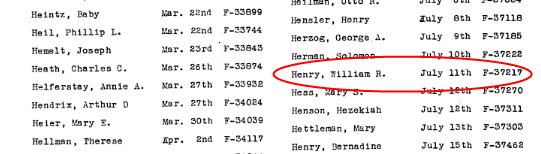
    1937 Baltimore City death index

    Could his death certificate somehow have been misfiled?  I do a quick search of the Baltimore Sun for July 12-16, 1937 and do in fact find a death notice for William R. Henry that died on July 11th.  There is mention of his parents (names that are not familiar) and he to be buried in Ohio.  This isn’t my William.
    So, perhaps he did not die in Baltimore City.  Next I search the county indexes.
    I click on the index for “1934-1944 Han-Hor” and page through the index and realize that the index is mislabeled.  It only covers “Han-Har”, the last card in the index is for George W. Harvey.
    I go back to the main search page and check the indexes for “1934-1944 Gam-Ham” and “1934-1944 Hos-Jones, J.” as maybe those have been mislabeled as well.  I find nothing for “He”.
    Well, this is disappointing!

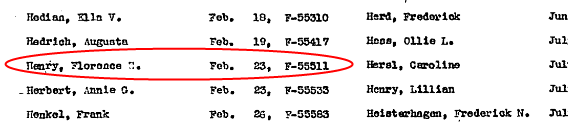
    Now I will search for Florence.  I go back to the city index for 1939.

    1939 Baltimore City death index

    Yay!  Finally! Progress!
    Although I plan on pulling this death certificate myself on my next visit to the Maryland Archives, I still like to generate an order form.  I like to print those out and place them in a folder that I labeled “Archives Search” so I have all the information I need when I go.
    At the top of the search page I will click on the link to “Order a copy of a certificate from this index page”
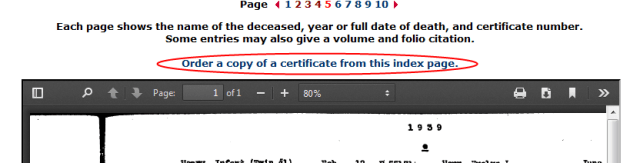
    Ordering a death certificate

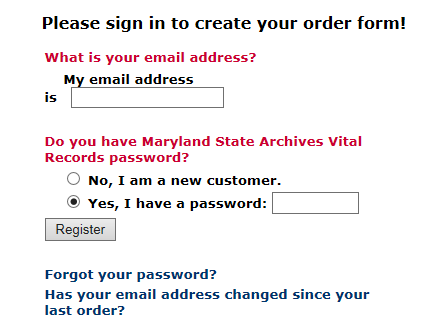
    At this point I am prompted to log in or create a new account.
    Since I have an account I will just log in.
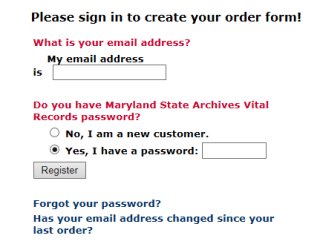
    Log in screen

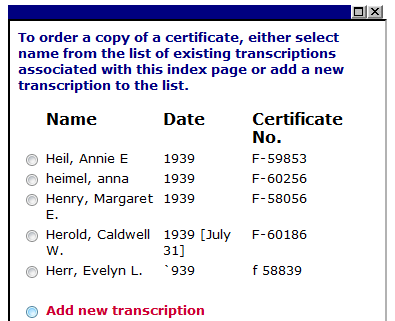
    Others have ordered certificates from this page based on the window that pops up.
    I like when a certificate I am interested in shows up here because it means at least one other person out there somewhere is interested in this person as well.
    Florence isn’t on this list so I have to “Add a new transcription”
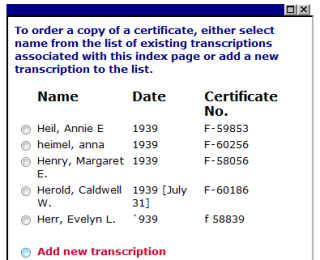
    Existing transcriptions

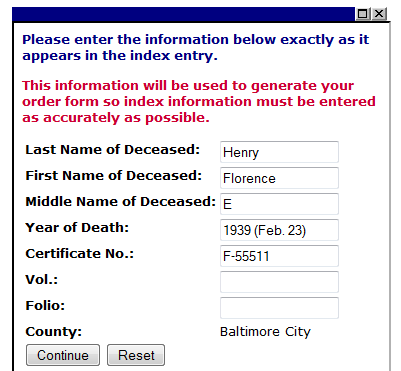
    I fill out the form.
    Notice that for the date it only asks for the Year of Death.  I like to put the date in parentheses so it prints out on the form.  For this date range there are no Volumes and Folios listed in the index so I just leave that blank.

    Transcription for Florence E. Henry

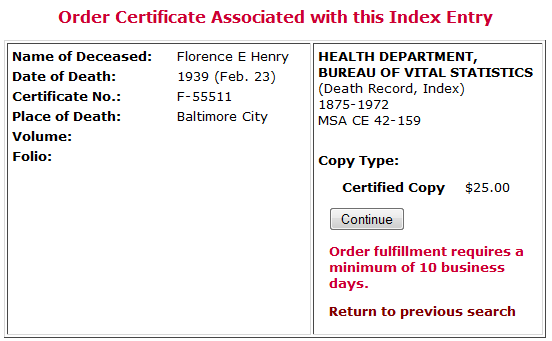
    When I click Continue the transcription and pricing information is generated.

    After clicking continue, the screen shows my Shipping and Billing information since I already have an account. No screen shots here!!  HA!
    Next it generates the order form which I can print out.
    The page can be sent directly to the printer.  If your computer has a PDF print driver installed you could also save it as a PDF file.
    Since it is in HTML format it can be saved, but as a webpage.

    At this point I have all the information I can get from the death index, but I still do not have any information on William’s death certificate.  My guess is that he died in a Maryland county but it is entirely possible he didn’t even die in Maryland.

    Since his death notice in the Baltimore Sun said he was to be buried at Moreland Memorial Park I will check findagrave.com and billiongraves.com to see if there is an entry for him.
    Findagrave.com only has one Henry entry (not him) for Moreland Memorial Park and there are none for billiongraves.com.

    I decide to try to give the cemetery a call to see if they can provide any information over the phone.  Some cemeteries will, some won’t.  Since I live near the Baltimore area I can certainly visit the cemetery in person.  However, it is a large municipal cemetery so walking it to find them will probably not be productive.
    Before I call I check their website for information (some have maps on the site, Moreland Memorial Park does not) make a list of my questions:

    1. In what plots in the cemetery are they buried?
    2. Do they have maps of the cemetery in the office?
    3. Does she know where William died?
    4. Does she know what funeral home handled the arrangements?
    5. What were their birth dates?
    6. Is there anyone else buried in their plot?
    7. Can I get a hard copy of the information? 

    I call and the lady that answers is very nice and offers to look him up. So I start down my list.

    1. They are buried in Section E-14, Plots 1 and 2.  She then says the graves are unmarked.  Of course they are, that is my luck.
    2. Yes, they have maps in the office.  I want a map!
    3. William died in Sykesville, Maryland.  She also mentioned that Florence died “at home”.  Sykesville, could he have been a patient at Springfield State Hospital?
    4. L.J. Ruck handled William’s arrangements.  I will have to check to see if Ruck has any funeral home records available.

    At this point she says that she needs to go because the other lines are ringing.  I am not upset, I will try to visit in person soon.  Most likely, since she gave me some information over the phone, I can get more in person, and hard copies.

    So, if William died in Sykesville (Carroll County) that would explain why I couldn’t locate him in the death index since the county index was missing for part of the alphabet.

    I can pull the certificate pretty easily knowing the county and the date but it would still be nice to see it in the index.
    That is when I remember that the indexes are also located on the Maryland State Archives Guide To Government Records.
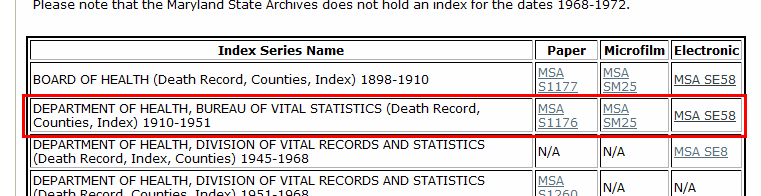
    I go to the guide, go to death records and scroll down to The County Death Records 1898-1972.
    I find the correct series and find that they have an Electronic version.

    http://guide.mdsa.net/viewer.cfm?page=death

    I click on the MSA SE58 link to bring up the county index lists, scroll to the appropriate date range  and click the Link button.

    http://guide.mdsa.net/series.cfm?action=viewDetailedSeries&ID=SE58&column=%5BID%5D&sort=asc&page=2

    This is a huge file so I give it some time to fully load, it took a couple minutes to load the 10,106 pages in the index.
    I don’t want to scroll through a bunch of pages so I take a guess and jump to page 5000. Hensley, not bad, pretty close.
    Let’s try 4970.  Henry, Walter Eugene.  Getting closer.
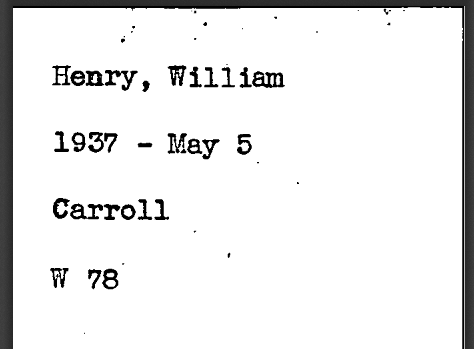
    Page 4972 is the winner.  Found him.

    http://msa.maryland.gov/megafile/msa/stagsere/se1/se58/000100/000116/pdf/se58-000116.pdf   Page 4972

    Now I feel better that I did find him in an index.  This wasn’t necessary, as I said before I could have pulled his certificate without the index but it does verify that this William Henry died on May 5, 1937 in Carroll County at age 78.  My William was born about 1859, that would make him 78 in 1937.

    I print out the index card and place it in my Archives search folder.

    Let’s do a quick check to see where I am with my goals:

    1. When and where exactly was William born?  Don’t know.  Hopefully when I get his death certificate I will get a clue to that information.
    2. When and where did William die?  May 5, 1937 in Carroll County, MD (Sykesville).  More specific info should be on his death certificate.
    3. When and where were William and Florence married?  I haven’t even started this search yet!
    4. What is Florence’s maiden name?  SPARKS.  I need to do some searches and see if I can find her before she got married to William.
    5. What happened to Edna’s husband (since no one remembers him, only her)?   Oh Edna!  You are killing me with this one.  My mother said she was going to visit Aunt Ruth today, maybe she will remember something to give me a hint.
    6. Can I find any new information on William that will lead to new information on his father John Baker Henry, brother Charles Dorsey Henry or grandfather Charles L. Henry?   Not yet.

    I realized in my goals I forgot to add my goals for Florence (where/when she was born and where/when she died.  She died Feb. 23, 1939 in Baltimore City, MD (most likely at 3030 Westfield Avenue).  Her death certificate should hopefully provide that information and birth information as well.

    I have much that I still need to do but I am headed in the right direction.
    This will be my last post on this project.  I will try to post an update as I find more but I think that I showed how to use some of the resources for Maryland research.  That was my big picture goal.  Search strategies will always vary depending on what information you have and what you want to know but hopefully this gave less experienced researchers so pointers.

    My other suggestions:

    -Use a research log.
    When I first started researching I know I searched the same resources for the same person multiple times because I didn’t keep a log.  Many free logs templates are available on the internet.

    -Make sure to source your records.
    You should be able to pinpoint exactly where your information came from, even if it was from a conversation with a relative.  The internet is a great resource but it is ever changing.  Records you find on-line today may be moved, web sites change etc.  Don’t assume you will remember where it came from!

    -Revisit your information every few years..
    More and more records are becoming available.  Just because you can’t find it now doesn’t mean you will never be able to find it.  When I first discovered this family in the early 2000s I could not have found all this from the comfort of my home office.  It was all available, just not so easily.

    -Field trips are good.
    All of this on-line research will be followed up by some field trips.  I will go to the library to search for more newspaper articles.  I will go to the MD State Archives to pull death certificates, birth information for Edna, and marriage information for William and Florence.

    -Don’t forget about genealogical and historical societies.
    Although I didn’t use them here, another great resource for Maryland research is the Maryland Historical Society and the various genealogical societies. It may not be financially possible to join all of them but join at least one and try to be as active as possible.  You research will improve and you never know who you will meet!

    -Check your local library to see what services they provide for genealogical research.
    Public libraries many times offer access to subscription services; Ancestry.com, genealogybank.com, newspapers.com, local newspapers.  Also see what microfilmed records they have.  Different branches may have different resources.  I have a U.S. subscription to ancestry.com but go to the library if I want to search the World records.  I can use my own laptop by connecting to their wi-fi network. 

    Join social media groups.
    Message boards and mailing lists are not as popular as they used to be but groups on Facebook, for example, are on the rise.  You never know who you will connect with.